XIOS User
Calendar#
How to define a calendar#
XIOS has an embedded calendar module which needs to be configured before you can run your simulation.
Only the calendar type and the time step used by your simulation are mandatory to have a well defined calendar. For example, a minimal calendar definition could be:
-
from the XML configuration file:
<?xml version="1.0"?> <simulation> <context id="test"> <calendar type="Gregorian" timestep="1.5h" /> </context> </simulation> -
from the Fortran interface:
! ...
TYPE(xios_context) :: ctx_hdl
! ...
! Context initialization ommited, see the corresponding section of this user manual and of the reference manual
CALL xios_get_handle("test",ctx_hdl)
CALL xios_set_current_context(ctx_hdl)
CALL xios_define_calendar(type="Gregorian", timestep=1.5*xios_hour)
The calendar type definition is done once and for all, either from the XML configuration file or the Fortran interface, and cannot be modified. However there is no such restriction regarding the time step which can be defined at a different time than the calendar type and even redefined multiple times.
For example, it is possible to the achieve the same minimal configuration as above by using both the XML configuration file:
<?xml version="1.0"?>
<simulation>
    <context id="test">
        <calendar type="Gregorian" />
    </context>
</simulation>
and the Fortran interface:
! ...
TYPE(xios_context) :: ctx_hdl
! ...
! Context initialization ommited, see the corresponding section of this user manual and of the reference manual
CALL xios_get_handle("test",ctx_hdl)
CALL xios_set_current_context(ctx_hdl)
! xios_define_calendar cannot be used here because the type was already defined in the configuration file.
! Ommiting the following line would lead to an error because the timestep would be undefined.
CALL xios_set_timestep(timestep=1.5*xios_hour)
The calendar also has two optional date parameters:
-
the start date which corresponds to the beginning of the simulation
-
the time origin which corresponds to the origin of the time axis.
If they are undefined, those parameters are set by default to "0000-01-01 00:00:00". If you are not interested in specific dates, you can ignore those parameters completely. However if you wish to set them, please note that they must not be set before the calendar is defined. Thus the following XML configuration file would be for example invalid:
<?xml version="1.0"?>
<simulation>
    <context id="test">
        <!-- Invalid because the calendar type cannot be known at that point -->
        <calendar start_date="2011-11-11 13:37:42" />
    </context>
</simulation>
while the following configuration file would be valid:
<?xml version="1.0"?>
<simulation>
    <context id="test">
        <!-- The order of the arguments does not matter so this is valid -->
        <calendar time_origin="2011-11-11 13:37:42" type="Gregorian" />
    </context>
</simulation>
Of course, it is always possible to define or redefine those parameters from the Fortran interface, directly when defining the calendar:
! ...
TYPE(xios_context) :: ctx_hdl
! ...
! Context initialization ommited, see the corresponding section of this user manual and of the reference manual
CALL xios_get_handle("test",ctx_hdl)
CALL xios_set_current_context(ctx_hdl)
CALL xios_define_calendar(type="Gregorian", time_origin=xios_date(1977, 10, 19, 00, 00, 00), start_date=xios_date(2011, 11, 11, 13, 37, 42))
or at a later time:
! ...
TYPE(xios_context) :: ctx_hdl
! ...
! Context initialization ommited, see the corresponding section of this user manual and of the reference manual
CALL xios_get_handle("test",ctx_hdl)
CALL xios_set_current_context(ctx_hdl)
CALL xios_define_calendar(type="Gregorian")
CALL xios_set_time_origin(time_origin=xios_date(1977, 10, 19, 00, 00, 00))
CALL xios_set_start_date(start_date=xios_date(2011, 11, 11, 13, 37, 42))
To simplify the use of dates in the XML configuration files, it is
possible to partially define a date as long as the omitted parts are the
rightmost. In this case the remainder of the date is initialized as in
the default date. For example, it would be valid to write:
start_date=1977-10-19 instead of start_date=1977-10-19 00:00:00 or
even time_origin=1789 instead of time_origin=1789-01-01 00:00:00.
Similarly, it is possible to express a date with an optional duration
offset in the configuration file by using the date + duration
notation, with date potentially partially defined or even completely
omitted. Consequently the following examples are all valid in the XML
configuration file:
-
time_origin=2011-11-11 13:37:00 + 42s -
time_origin=2014 + 1y 2d -
start_date=+ 36h.
How to define a user defined calendar#
Predefined calendars might not be enough for your needs if you simulate phenomenons on another planet than the Earth. For this reason, XIOS can let you configure a completely user defined calendar by setting the type attribute to "user_defined". In that case, the calendar type alone is not sufficient to define the calendar and other parameters should be provided since the duration of a day or a year are not known in advance.
Two approaches are possible depending on whether you want that your custom calendar to have months or not: either use the month_lengths attribute to define the duration of each months in days or use the year_length attribute to define the duration of the year in seconds. In both cases, you have to define day_length, the duration of a day in seconds. Those attributes have to be defined at the same time than the calendar type, either from the XML configuration file or the Fortran interface, for example:
<?xml version="1.0"?>
<simulation>
    <context id="test">
        <calendar type="user_defined" day_length="86400" month_lengths="(1, 12) [31 28 31 30 31 30 31 31 30 31 30 31]" />
    </context>
</simulation>
or
! ...
TYPE(xios_context) :: ctx_hdl
! ...
! Context initialization ommited, see the corresponding section of this user manual and of the reference manual
CALL xios_get_handle("test",ctx_hdl)
CALL xios_set_current_context(ctx_hdl)
CALL xios_define_calendar(type="Gregorian", day_length=86400, year_length=31557600)
Note that if no months are defined, the format of the dates is modified
in the XML configuration file since the month must be omitted. For
example, 2015-71 13:37:42 would be the correct way to refer to the
71st day of the year 2015 at 13:37:42. If you use the Fortran interface,
the month cannot be omitted but you have to make sure to always set it
to 1 in that case. For example, use
xios_date(2015, 01, 71, 13, 37, 42)for 2015-71 13:37:42. Moreover,
it is possible that the duration of the day is greater than the duration
of the year on some planets. In this case, it obviously not possible to
define months so you have to use the year_length attribute.
Additionally the day must also be omitted from the dates in the
configuration file (for example 2015 13:37:42) and must always be set
to 1 when using the Fortran interface (for example
xios_date(2015, 01, 01, 13, 37, 42)).
If months have been defined, you might want to have leap years to correct the drift between the calendar year and the astronomical year. This can be achieved by using the leap_year_drift and leap_year_month attributes and optionally the leap_year_drift_offset attribute. The idea is to define leap_year_drift, the yearly drift between the calendar year and the astronomical year as a fraction of a day. This yearly drift is summed each year to know the current drift and each time the current drift is greater or equal to one day, the year is considered a leap year. In that case, an extra day is added to the month defined by leap_year_month and one day is subtracted to the current drift. The initial drift is null by default but it can be fixed by the leap_year_drift_offset attribute.
The following configuration file defines a simplified Gregorian calendar using the user calendar feature:
<?xml version="1.0"?>
<simulation>
    <context id="test">
        <calendar type="user_defined"
                    day_length="86400"
                    month_lengths="(1, 12) [31 28 31 30 31 30 31 31 30 31 30 31]"
                    leap_year_month="2"
                    leap_year_drift="0.25"
                    leap_year_drift_offset="0.75"
                    time_origin="2012-02-29 15:00:00"
                    start_date="2012-03-01 15:00:00" />
    </context>
</simulation>
As you know, the astronomical year on Earth is approximately a quarter of day longer than the Gregorian calendar year so we have to define the yearly drift as 0.25 day. In case of a leap year, an extra day is added at the end of February which is the second month of the year so leap_year_month should be set to 2. We start our time axis in 2012 which was a leap year in the Gregorian calendar. This means there was previously three non-leap years in a row so the current drift was (approximately) 3×0.25 days, hence leap_year_drift_offset should be set to 0.75. At the beginning of 2013, the drift would have been 0.75+0.25=1 day so 2012 will be a leap year as expected.
How to use the calendar#
The calendar is created immediately after the calendar type has been defined and thus can be used even before the context definition has been closed.
Once the calendar is created, you have to keep it updated so that it is in sync with your simulation. To do that, you have to call the xios_update_calendar subroutine for each iteration of your code:
! ...
INTEGER :: ts
! ...
DO ts=1,end
    CALL xios_update_calendar(ts)
    ! Do useful stuff
ENDDO
The current date is updated to start_date + ts × timestep after each call.
Many other calendar operations are available, including:
-
accessing various calendar related information like the time step, the time origin, the start date, the duration of a day or a year, the current date, etc.
-
doing arithmetic and comparison operations on date:
TYPE(xios_date) :: date1, date2 TYPE(xios_duration) :: duration LOGICAL :: res ! we suppose a calendar is defined CALL xios_get_current_date(date1) duration = xios_duration(0, 0, 1, 0, 0, 0, 0, 0) + 12 * xios_hour date2 = date1 + duration + 0.5 * xios_hour res = date2 > date1 duration = date2 - date1 -
converting dates to
-
the number of seconds since the time origin, the beginning of the year or the beginning of the day,
-
the number of days since the beginning of the year,
-
the fraction of the day or the year.
-
For more detailed about the calendar attributes and operations, see the XIOS reference guide.
Files#
Since files are central to an I/O server, the configuration of XIOS is built around file objects. Those objects correspond directly to files on the computer file system which are either to be written or to be read. Although, XIOS currently only supports the NetCDF format, XIOS files are a generic abstraction. Each file can contain one or more fields (each field being defined on a grid) and optionally variables. In the NetCDF nomenclature, fields defined in XIOS correspond to NetCDF variables and XIOS variables are NetCDF attributes. As fields, variables and grids are complex objects, they have their own chapters and we will focus only on files in this section.
How to define your first file#
If you wish to input or to output data using XIOS, you will need to define at least one file. This can be done from both the XML configuration file and the Fortran interface. Files are usually defined in the configuration file, although their definitions are sometimes amended using the API.
File objects are defined with the <file> tag and should always be
inside the <file_definition> section. Only the output frequency is
mandatory to have a well defined file but it is generally a good idea to
give it a name. The following example shows a minimal configuration file
which defines one file.
<?xml version="1.0"?>
<simulation>
    <context id="test">
        <calendar type="Gregorian" timestep="1h" />

        <file_definition>
            <file name="output" output_freq="1ts">
                <!-- Content of the file ommited for now -->
            </file>
        </file_definition>
    </context>
</simulation>
Note that the file extension could depend of the format so it is automatically added to the chosen name by XIOS. Since XIOS only support NetCDF formats for now, the extension is always ".nc". If the name is not set, XIOS will use the id of the file object instead. This id is generated automatically by XIOS if it was not set by the user.
The output frequency is particularly important since it defines the interval of time between two consecutive outputs, that is in NetCDF nomenclature the interval between two records. In the example, the data would be written for every timestep (independently of the timestep duration). It is possible to use any duration as the output frequency but be careful if you are not using a duration which is a multiple of the timestep duration since XIOS might not be doing what you want.
The same configuration could be obtained from the Fortran interface as well:
! ...
TYPE(xios_context)   :: ctx_hdl
TYPE(xios_file)      :: file_hdl
TYPE(xios_filegroup) :: filegroup_hdl
! ...
! Context and calendar initializations ommited, see the corresponding section of this user manual and of the reference manual
CALL xios_get_handle("test", ctx_hdl)
CALL xios_set_current_context(ctx_hdl)
CALL xios_get_filegroup_handle("file_definition", filegroup_hdl)
CALL xios_add_file(filegroup_hdl, file_hdl)
CALL xios_set_attr(file_hdl, name="output", output_freq=xios_timestep)
Another important parameter for file is the mode attribute which is set by default to "write". You need to set it to "read" if you want to use XIOS to handle inputs. Note that in this case the output_freq attribute must correspond to the output frequency used to create the input file.
When using the "write" mode, it is possible to append the data to an existing file instead of overwriting it by setting the append attribute to "true". In this case, you must be careful not to modify the structure of the file, in particular no fields should be added, modified nor removed, or XIOS will throw an error.
If you wish to disable a file without having to remove its definition from the configuration file, you can set the enabled attribute to "false".
How to use parallel I/O#
By default XIOS will create one file by server, each file being suffixed with the rank of the server. For example, if the sample configuration used in the previous section was used with two servers, two files named "output_0.nc" and "output_1.nc" would be created. Each file would contain only the portion of the fields affected to the corresponding server. This default mode can also be explicitly configured by setting the type attribute to "multiple_file".
Using the "multiple_file" mode is often a reliable way to achieve good performances, particularly if you only have a few servers. However having multiple files also increases the complexity of the post-processing chains and it is often much easier to always get one file regardless of how many servers are used.
It is possible to achieve such behavior in XIOS by setting the type attribute to "one_file". This feature depends directly on the NetCDF library capabilities so you need to make sure that XIOS was properly linked with a parallel version of NetCDF. If the library was not compiled with parallel input/output support, XIOS will issue a warning and revert to the "multiple_file" mode.
Supported NetCDF formats#
XIOS supports only the version 4 or later of NetCDF library. It uses by default the new NetCDF-4 format which relies on HDF5 format as a back-end. This format can also be selected explicitly by setting the format attribute to "netcdf4".
Alternatively, it also possible to force NetCDF-4 to use the classic NetCDF-3 binary format by setting the format attribute to "netcdf4_classic". When using this older format, some features might be unavailable but current version of XIOS should not be affected much.
Depending on the format, there are some specific requirements on how the NetCDF library should have been compiled:
-
"netcdf4" format requires that HDF5 support has been enabled in NetCDF using the configuration option
-–enable-netcdf4and that the HDF5 library has been properly linked. -
"netcdf4" format used in "one_file" mode requires that the HDF5 library has been compiled with parallel support using the configuration option
-–enable-parallel. -
"netcdf4_classic" format used in "one_file" mode requires that Parallel NetCDF support has been enabled in NetCDF using the configuration option
-–enable-pnetcdfand that the Parallel NetCDF library has been properly linked.
UGRID#
In addition to the CF conventions, it is also possible to output data using UGRID metadata conventions developed for unstructured meshes. It allows users to store the topology of an underlying unstructured mesh. Currently XIOS supports 2D unstructured meshes of any shape (triangular, quadrilateral, etc) and their mixture.
A 2D mesh can be described by a set of nodes, edges and/or faces. XIOS allows one to define data on any of these three types of elements. XIOS will generate a full list of connectivity attributes proposed by the UGRID conventions. For example in case of a mesh comprised of faces the following connectivity parameters will be the calculated:
-
edge_node_connectivity -
face_node_connectivity -
edge_nodes_connectivity -
face_nodes_connectivity -
face_edges_connectivity -
edge_face_connectivity -
face_face_connectivity
In order to select UGRID output format, one has to set file attribute convention to UGRID (its default value is "CF"). Domain attribute nvertex is mandatory for UGRID. It servers for identifying one of three types of mesh elements on which data can be defined: nodes (nvertex=1), edges (nvertex=2), and faces (nvertex≥3). In order to write fields on the same mesh but on its different elements, one has to assign the same domain name to each of the domains. Example given below illustrates this point for three fields defined on the same mesh but on its different elements: nodes, edges, and faces.
<file_definition>
    <file id="output_UGRID" convention="UGRID">
        <field id="varOnNodes" ... domain_ref="node"/>
        <field id="varOnEdges" ... domain_ref="edge"/>
        <field id="varOnFaces" ... domain_ref="face"/>
    </file>
</file_definition>

<domain_definition>
    <domain id="node" name="mesh2D" nvertex="1"/>
    <domain id="edge" name="mesh2D" nvertex="2"/>
    <domain id="face" name="mesh2D" nvertex="4"/>
</domain_definition>
How to use file splitting#
Output files can often be quite huge, particularly if the "one_file" mode is used. In this case, it can be interesting to periodically split the file in order to have a few smaller files containing contiguous temporal portions of the output data.
This behavior can be achieved in XIOS by setting the split_freq attribute to the duration you want, as illustrated in the following example:
<?xml version="1.0"?>
<simulation>
    <context id="test">
        <calendar type="Gregorian" timestep="1h" />

        <file_definition>
            <file name="output" output_freq="1d" split_freq="1y">
                <!-- Content of the file ommited for now -->
            </file>
        </file_definition>
    </context>
</simulation>
With this configuration, some data will be outputted every day and a new file will be created every year.
Note that the split frequency is the duration after which a new file will be created, it does not mean that a new file will be created at the beginning of each period. For example, if you start your simulation the first of June 2014 and run it for two years with a split frequency of one year:
-
you will get two files containing respectively the period from June 1st, 2014 to May 31th, 2015 and from June 1st, 2015 to May 31th, 2016.
-
you will NOT get three files containing respectively the last six months of 2014, the full year of 2015 and the first six months of 2016.
XIOS automatically suffixes the file names with the start and end dates when using file splitting. By default, it will try to use the shortest date that still enables to distinguish the files. Thus in the above example, the files would be named "output_2014-2015.nc" and "output_2015-2016.nc". If you wish to force the date format used to prefix the files, you can define the split_freq_format attribute to override the default behavior.
A word about file synchronization#
File synchronization is usually not something you should worry about. However, it is important to understand that data written by XIOS might not be immediately written on the disk in practice. Input/output libraries like NetCDF and HDF5 and parallel file systems generally use complex caching policies for performance reasons. This means that your data might still be stored in memory after it was supposedly written.
It might become critical to control this behavior for two main reasons:
-
if you want to mitigate the impact of a crash, as all buffered data would be lost ;
-
if you want to be able to access the data from the output file immediately after writing it.
By default, XIOS will never force file synchronization but you can require it to do so by setting the sync_freq attribute to the wanted duration. In this case, XIOS will regularly instruct NetCDF to synchronize the file on disk by flushing its internal buffers.
Note file synchronization must be used sparingly as it can have a disastrous impact on performance. Make sure to use a reasonably high synchronization frequency to avoid any issue.
Fields and variables#
XIOS outsources the input/output definitions in its XML configuration file. In the last chapter we presented some general points about file objects. This chapter focuses on how to use fields and variables (that is variables and attributes in NetCDF nomenclature) to populate files.
How to define your first field#
If you wish to input or to output data using XIOS, you will need to define at least one file with one field. This can be done from both the XML configuration file and the Fortran interface. Fields are often defined in the configuration file, although their definitions are sometimes amended using the API.
Field objects are defined with the <field> tag and should always be
inside a <field_definition> or a <file> section. Only the grid and
the operation attached to the field are mandatory to have a well defined
field but it is generally a good idea to give it an identifier. The
following example shows a minimal configuration file which defines one
file with one field.
<?xml version="1.0"?>
<simulation>
    <context id="test">
        <calendar type="Gregorian" timestep="1h" />

        <grid_definition>
            <grid id="grid_A"><!-- Definition ommited --></grid>
        </grid_definition>

        <file_definition>
            <file name="output" type="one_file" output_freq="1ts">
                <field id="field_A" grid_ref="grid_A" operation="instant" />
            </file>
        </file_definition>
    </context>
</simulation>
It defines one file named "output" which contains one field "field_A" defined on a grid "grid_A". The file and the field are configured so that the data is written in the file at every timestep (using the output_freq file attribute) without any transformation (using the operation field attribute set to "instant").
The corresponding Fortran simulation loop could be:
DO ts=1,numberOfTimestep
    ! Inform XIOS of the current timestep
    CALL xios_update_calendar(ts)
    ! Compute field_A for current timestep
    ! ...
    ! Output the data
    CALL xios_send_field("field_A", field_A)
ENDDO
As you can see, the id of the field is used in the model to select the field for which data is being provided which makes this attribute extremely important. Note that it must be unique for all fields even if they are defined in different files. By default, the id of a field is also used as the name of the corresponding NetCDF variable. It is however possible to override this default name using the field attribute name. Two fields can share the same name as long as they are not used in the same file.
The second argument of the xios_send_field function is an array
containing the data. Its shape and content are not described here as
they depend directly on the grid. For more information on the data
layout, refer to the chapters focusing on grids, domains and axis.
The same configuration could also be obtained using the Fortran interface:
! ...
TYPE(xios_context)   :: ctx_hdl
TYPE(xios_file)      :: file_hdl
TYPE(xios_filegroup) :: filegroup_hdl
TYPE(xios_field)    :: field_hdl
! ...
! Context, calendar and grid initializations ommited, see the corresponding section of this user manual and of the reference manual
CALL xios_get_handle("test", ctx_hdl)
CALL xios_set_current_context(ctx_hdl)
CALL xios_get_filegroup_handle("file_definition", filegroup_hdl)
CALL xios_add_file(filegroup_hdl, file_hdl)
CALL xios_set_attr(file_hdl, name="output", output_freq=xios_timestep)
CALL xios_add_field(file_hdl, field_hdl, "field_A")
CALL xios_set_attr(field_hdl, grid_ref="grid_A", operation="instant")
Note that if you want to define a field on a grid with only one domain and/or one axis, it is possible to use the domain_ref and axis_ref attributes instead of the grid_ref attribute. A temporary grid will be created based on the domain and/or axis defined this way.
If you are using a grid with some masked points (see the relevant sections of this manual), you must set the default_value attribute to define the default value that will replace the missing values in the output file.
If you wish to disable a field without having to remove its definition from the configuration file, you can set the enabled attribute to "false".
How to use temporal operations#
The last section showed a very basic example where the data was outputted at every timestep using the "instant" operation. However in many use cases, it might be more interesting to output only the mean value on a certain period of time for example. This section describes the use of temporal operations available in XIOS.
The field attribute operation currently supports six modes:
-
instant: no temporal operation is applied which means the new data always overrides the previous one even if it was not outputted,
-
average: compute and output the mean value,
-
accumulate: compute and output the sum,
-
minimum: compute and output the minimum value,
-
maximum: compute and output the maximum value,
-
once : the data is written to the file only the first time it is received from the model, any subsequent data is ignored. The corresponding NetCDF variable does not have a time dimension.
The output frequency of the file defined by the output_freq attribute is used as the temporal operation period (except for the "once" operation for which there is no period). This means it is for example not possible to output a daily average and a weekly average in the same file.
This updated example shows how to output the daily average instead of the instant data for all timesteps:
<?xml version="1.0"?>
<simulation>
    <context id="test">
        <calendar type="Gregorian" timestep="1h" />

        <grid_definition>
            <grid id="grid_A"><!-- Definition ommited --></grid>
        </grid_definition>

        <file_definition>
            <file name="output" type="one_file" output_freq="1d">
                <field id="field_A" grid_ref="grid_A" operation="average" />
            </file>
        </file_definition>
    </context>
</simulation>
Compared to the previous example, only the file attribute
output_freq and the field attribute operation have been
modified. Computing the weekly minimum instead of the daily average
would be as simple as using output_freq=7dand operation=minimum.
Note that if you use a temporal operation and have default_value defined, it might be useful to set the attribute detect_missing_value to "true". This way temporal operations will not be applied when a default value is detected.
For example, we consider the values of a 2x2 domain for three timesteps:
If we suppose that the field is configured to compute the average on three timesteps, the resulting field would be: $\begin{bmatrix}\frac{7}{3} & \frac{13}{3}\\ 3 & \frac{7}{3} \end{bmatrix}$
If default_value is set to "-1" and detect_missing_value is set to "true", the resulting field would be: $\begin{bmatrix}4 & 7\\ 5 & \frac{7}{3} \end{bmatrix}$
How to use a specific data sampling#
It is sometimes useful to have more control on the data sampling. By default, the input data is used at every timestep but sometimes it is not what you want. The following examples illustrate such cases:
-
the model is not computing updated values at the same frequency for all fields (for example, a field is updated every two timesteps).
-
you want to output a specific instant value in the interval between two outputs.
-
you want to compute an average without taking into account all instant values in the interval between two outputs.
Data sampling can be controlled in XIOS using the freq_op (one timestep by default) and freq_offset (null by default) attributes. Those attributes define respectively how often data from the model must be used and the amount of time before starting to use it.
For following excerpts of configuration files show you to use those attributes to handle the motivating examples.
-
In this example, we suppose that we get two fields from the model: "field_A" which is computed for each timestep and "field_B" which is only computed every two timesteps. For both fields, we show how to compute and output the sum of all values received during 6 timesteps:
<file_definition> <file name="output" output_freq="6ts"> <field id="field_A" grid_ref="grid_A" operation="accumulate" /> <field id="field_B" grid_ref="grid_B" operation="accumulate" freq_op="2ts" /> </file> </file_definition> -
In this example, we show how to output the 11th instant value every 12 timesteps:
<file_definition> <file name="output" output_freq="12ts"> <field id="field_A" grid_ref="grid_A" operation="instant" freq_op="11ts" freq_offset="12ts" /> </file> </file_definition> -
In this example, we suppose that the timestep is equal to one hour and that the simulation starts at midnight. We show how to compute the weekly average of the field value at midday:
<file_definition>
    <file name="output" output_freq="1w">
        <field id="field_A" grid_ref="grid_A" operation="average" freq_op="1d" freq_offset="12h" />
    </file>
</file_definition>
How to use field references#
It is quite common that different temporal operations must be applied to
the same instant data provided by the model. In theory, the only
solution to handle this scenario would be to define a field for each
operation, give them different id and and call xios_send_field
with the same array of data for each of those fields.
The following example illustrates this solution for a field for which we want to compute the average, minimal and maximal values:
<?xml version="1.0"?>
<simulation>
    <context id="test">
        <calendar type="Gregorian" timestep="1h" />

        <grid_definition>
            <grid id="grid_A"><!-- Definition ommited --></grid>
        </grid_definition>

        <file_definition>
            <file name="output" output_freq="1d">
                <field id="field_A_avg" grid_ref="grid_A" operation="average" />
                <field id="field_A_min" grid_ref="grid_A" operation="min" />
                <field id="field_A_max" grid_ref="grid_A" operation="max" />
            </file>
        </file_definition>
    </context>
</simulation>
To simplify the handling of such scenarios, XIOS has a "reference" feature which allows one field to inherit the attributes (except the id) and the instant data of another field. The above example can then be rewritten:
<?xml version="1.0"?>
<simulation>
    <context id="test">
        <calendar type="Gregorian" timestep="1h" />

        <grid_definition>
            <grid id="grid_A"><!-- Definition ommited --></grid>
        </grid_definition>

        <file_definition>
            <file name="output" output_freq="1d">
                <field id="field_A" name="field_A_avg" grid_ref="grid_A" operation="average" />
                <field field_ref="field_A" name="field_A_min" operation="min" />
                <field field_ref="field_A" name="field_A_max" operation="max" />
            </file>
        </file_definition>
    </context>
</simulation>
With this configuration, only one call to
xios_send_field(“field_A”, field_A) is needed. Note how inherited
attributes (like name or operation for example) are overwritten
to obtain the desired configuration. Additionally, be aware that it is
the instant values which are inherited, not the result of the operation
on the field.
Similarly, it is sometimes useful to output the result of a temporal
operation on a field for different periods. In this case, it does not
really make sense to define the field that will be then inherited in one
file rather than another. A solution is to make use of the
field_definition section so that it is clear that the field can be
reused in any file. This is illustrated in the following sample
configuration file:
<?xml version="1.0"?>
<simulation>
    <context id="test">
        <calendar type="Gregorian" timestep="1h" />

        <grid_definition>
            <grid id="grid_A"><!-- Definition ommited --></grid>
        </grid_definition>

        <field_definition>
            <field id="field_A" name="field_A" grid_ref="grid_A" operation="average" />
        </field_definition>

        <file_definition>
            <file name="output_1d" output_freq="1d">
                <field field_ref="field_A" />
            </file>
            <file name="output_1mo" output_freq="1mo">
                <field field_ref="field_A" />
            </file>
        </file_definition>
    </context>
</simulation>
How to use arithmetic operations#
Since XIOS aims to reduce as much as possible the need for post-processing, it can apply some arithmetic operations on the data it handles (regardless of its provenance).
All usual operators (+, -, *, /, \^, that is addition, subtraction, multiplication, division and exponentiation) and some common functions (like cos, sin, tan, exp, log, log10, sqrt) are supported.
The following example shows how to use arithmetic operations:
<?xml version="1.0"?>
<simulation>
    <context id="test">
        <calendar type="Gregorian" timestep="1h" />

        <grid_definition>
            <grid id="grid_A"><!-- Definition ommited --></grid>
        </grid_definition>

        <field_definition>
            <field id="field_A" grid_ref="grid_A" operation="average" />
        </field_definition>

        <file_definition>
            <file name="output" output_freq="1d">
                <field id="field_B" field_ref="field_A">field_A + 273.15</field>
                <field id="field_C" field_ref="field_A">log10(field_B)</field>
            </file>
        </file_definition>
    </context>
</simulation>
With this configuration, only one call to
xios_send_field(“field_A”, field_A) is needed. In this example
field_ref is used only to inherit the attributes from "field_A",
the instant values are not inherited since an expression has been given
for "field_B" and "field_C". Note that it is possible to use fields
obtained from an expression in another expression, thus the expression
of "field_C" is equivalent to log10(field_A + 273.15).
The special keyword this can be used in an expression to refer to the instant data received from the model by the current field. For example, the previous configuration file could be rewritten as follow:
<?xml version="1.0"?>
<simulation>
    <context id="test">
        <calendar type="Gregorian" timestep="1h" />

        <grid_definition>
            <grid id="grid_A"><!-- Definition ommited --></grid>
        </grid_definition>

        <file_definition>
            <file name="output" output_freq="1d">
                <field id="field_B" grid_ref="grid_A" operation="average">this + 273.15</field>
                <field id="field_C" field_ref="field_B">log10(field_B)</field>
            </file>
        </file_definition>
    </context>
</simulation>
and the Fortran call would be replaced by
xios_send_field(“field_B”, field_B).
XIOS also provides the means to define an expression in a Fortran code via the field attribute "expr". The example above can rewritten as
<?xml version="1.0"?>
<simulation>
    <context id="test">
        <calendar type="Gregorian" timestep="1h" />

        <grid_definition>
            <grid id="grid_A"><!-- Definition ommited --></grid>
        </grid_definition>

        <file_definition>
            <file name="output" output_freq="1d">
                <field id="field_B" grid_ref="grid_A" operation="average">
                <field id="field_C" field_ref="field_B">
            </file>
        </file_definition>
    </context>
</simulation>
while the two expressions can be specified with the following calls:
xios_set_field_attr(“field_B”, expr=”@this + 273.15” and
xios_set_field_attr(“field_C”, expr=”log10(field_B)”.
How to chain multiple temporal operations#
By default, all field names appearing in an expression refer to the instant data of those fields. To refer to the result of a temporal operation, the field name must be prefixed with "@".
This feature allows to chain multiple temporal operations as illustrated bellow:
<?xml version="1.0"?>
<simulation>
    <context id="test">
        <calendar type="Gregorian" timestep="1h" />

        <grid_definition>
            <grid id="grid_A"><!-- Definition ommited --></grid>
        </grid_definition>

        <field_definition>
            <field id="field_A" grid_ref="grid_A" operation="average" />
        </field_definition>

        <file_definition>
            <file name="output" output_freq="7d">
                <field name="field_A_min_of_average" grid_ref="grid_A" operation="min" freq_op="1d">@field_A</field>
            </file>
        </file_definition>
    </context>
</simulation>
This example shows how to compute the minimum on 7 days of the daily average of "field_A". In this context, the freq_op attribute defines the period of the temporal operation for all fields pointed with the "@" operator in the expression.
Another use of this feature is to do arithmetic operations on the result of temporal operations. The following configuration file for example shows how to output the standard deviation for a field on a one day period:
<?xml version="1.0"?>
<simulation>
    <context id="test">
        <calendar type="Gregorian" timestep="1h" />

        <grid_definition>
            <grid id="grid_A"><!-- Definition ommited --></grid>
        </grid_definition>

        <field_definition>
            <field id="field_A" grid_ref="grid_A" operation="average" />
            <field id="field_A_square" field_ref="grid_A">field_A * field_A</field>
        </field_definition>

        <file_definition>
            <file name="output" output_freq="1d">
                <field name="field_A_std_dev" grid_ref="grid_A" operation="instant" freq_op="1d">sqrt(@field_A_square - @field_A^2)</field>
            </file>
        </file_definition>
    </context>
</simulation>
Note that since an "instant" operation is used, freq_op and output_freq are identical in this scenario.
How to access the data of a field#
In order not to waste memory, the instant data of a field can be read from the model only if:
-
it is part of a file whose attribute mode is "read"
-
or its attribute read_access is set to "true".
In any other case, trying to access the field data would cause an error.
The following configuration file:
<?xml version="1.0"?>
<simulation>
    <context id="test">
        <calendar type="Gregorian" timestep="1h" />

        <grid_definition>
            <grid id="grid_A"><!-- Definition ommited --></grid>
        </grid_definition>

        <file_definition>
            <file name="input" output_freq="1ts">
                <field id="field_A" grid_ref="grid_A" operation="instant" />
            </file>
        </file_definition>
    </context>
</simulation>
can be used with this Fortran code:
DO ts=1,numberOfTimestep
    ! Get field_A for current timestep
    CALL xios_recv_field("field_A", field_A) ! field_A must be an allocated array with the right size
    ! Do useful things...
    ! Inform XIOS of the current timestep
    CALL xios_update_calendar(ts)
ENDDO
The call to xios_recv_field might block for a while if the data was
not yet received from the server(s) but it should not happen too often
thanks to the prefetching done by XIOS.
Since the read_access attribute allows to the access fields which
depend directly on data from the model, you must be very careful with
the order of the xios_send_field and xios_recv_field calls. For
example, consider the following configuration file (just a simple
example as in practice it does not make much sense to use it):
<?xml version="1.0"?>
<simulation>
    <context id="test">
        <calendar type="Gregorian" timestep="1h" />

        <grid_definition>
            <grid id="grid_A"><!-- Definition ommited --></grid>
        </grid_definition>

        <field_definition>
            <field id="field_A" grid_ref="grid_A" operation="instant" />
        </field_definition>

        <file_definition>
            <file name="output" output_freq="1ts">
                <field id="field_B" grid_ref="grid_A" operation="instant" read_access="true">field_A / 42</field>
            </file>
        </file_definition>
    </context>
</simulation>
If you call xios_recv_field(“field_B”, field_B) before
xios_send_field(“field_A”, field_A), the requested data will never be
available and a deadlock could occur. In practice, XIOS will detect the
problem and throw an error.
How to reduce the size of an output file#
The size of the output files can sometimes become a problem. XIOS provides some features which may help to reduce the size of the output files losslessly.
The first solution is to use the compression feature provided by HDF5 which allows a field to be compressed using gzip. Since it depends directly on HDF5, this feature works only when the NetCDF-4 format is used. Since HDF5 does not (yet) support compression for parallel output, one has to use two server-level functionality (see Launching secondary server) or to engage the "multiple_file" mode.
To enable the gzip compression of a field, you need to set the compression_level attribute to any integer between 1 and 9 (by default this attribute is set to 0 which means that compression is disabled). Using an higher compression level should improve the compression ratio at the cost of using more processing power. Generally using a compression level of 2 should be a good trade-off.
The following example illustrates the use of the gzip compression:
<?xml version="1.0"?>
<simulation>
    <context id="test">
        <calendar type="Gregorian" timestep="1h" />

        <grid_definition>
            <grid id="grid_A"><!-- Definition ommited --></grid>
        </grid_definition>

        <file_definition>
            <file name="output" output_freq="1ts" compression_level="2">
                <field id="field_A" grid_ref="grid_A" operation="average" compression_level="4" />
                <field id="field_B" grid_ref="grid_A" operation="average" compression_level="0" />
                <field id="field_C" grid_ref="grid_A" operation="average" />
            </file>
        </file_definition>
    </context>
</simulation>
Note that the compression_level attribute can also be set at a file level, in this case it is inherited by all fields of the file unless they explicitly override the attribute.
The second solution is available only if you are using a grid with masked values. In this case, you can choose to output the indexed grid instead of the full grid by setting the indexed_output attribute to "true". Missing values are then omitted and extra arrays are outputted so that the translation from the "compressed" indexes to the true indexes can be done. Due to those arrays of indexes, indexed output should be considered only if there is enough masked values. For more details about this feature, please refer to section 8.2 "Compression by Gathering" of the Climate and Forecast (CF) Convention.
Grid#
Overview#
Grid plays an important role in XIOS. Same as Field, Grid is one of the basic elements in XIOS, which should be well defined, not only in the configuration file but also in the FORTRAN code. Because, until now, XIOS has mainly served for writing NetCDF data format, most of its components are inspired from NetCDF Data Model, and Grid is not an exception. Grid is a concept describing dimensions that contain the axes of the data arrays. Moreover, Grid always consists of an unlimited dimension whose length can be expanded at any time. Other dimensions can be described with Domain and Axis. The followings describe how to make use of Grid in XIOS. Details of its attributes and operations can be found in XIOS reference guide.
Working with configuration file#
As mentioned above, a grid contains the axes of the data arrays, which are characterized by Domain and/or Axis. A domain is composed of a 2-dimension array, meanwhile an axis is, as its name, an 1-dimension array.
Like other components of XIOS, a grid is defined inside its definition part with the tag grid_definition
 <grid_definition>
   <grid_group id="gridGroup">
     <grid id="grid_A">
       <domain domain_ref="domain_A" />
       <axis axis_ref="axis_C" />
     </grid>
     <grid id="grid_Axis">
       <axis axis_ref="axis_D" />
     </grid>
     <grid id="grid_All_Axis">
       <axis axis_ref="axis_A" />
       <axis axis_ref="axis_B" />
       <axis axis_ref="axis_C" />
     </grid>
   </grid_group>
 </grid_definition>
As XIOS supports netCDF-4/HDF5, it allows user to gather several grids into groups to better organize data. Very often, grids are grouped, basing on the dimensions that they describe. However, there is not a limit for user to group out the grids. The more important thing than grid_group is grid. A grid is defined with the tag grid.
While it is not crucial for a grid group not to have an identification specified by attribute id, a grid must be assigned an id to become useful. Unlike grid group is a way of hierarchically organizing related grid only, a grid itself is referenced by fields with its id. Without the id, a grid can not be made used of by a field. Id is a string of anything but there is one thing to remember: id of a grid as well as id of any component in XIOS are unique among this kind of components. It is not allowed to have two grids with a same id, but it is permitted a grid and, for example, a domain to share a same one.
A grid is defined by domain(s) and axis. A domain represents two-dimension data while an axis serves as one-dimension data. They are defined inside the grid definition. One of the convenient and effective way to reuse the definitions in XIOS is to take advantage of attribute *_ref. On using *_ref, the referencing component has all attributes from its referenced one. As the example below, grid with id "grid_A" (from now one, called grid_A), is composed of one domain whose attributes derived directly from another one-domain_A, and one axis whose attributes are taken from axis axis_C, which are defined previously.
<domain id="domain_A" />
<axis id="axis_A" />

<grid id="grid_A">
   <domain domain_ref="domain_A" />
   <axis axis_ref="axis_C" />
 </grid>
The *_ref can only used to reference to a already defined element (e.g domain, axis, grid, etc). If these *_ref have not been defined yet, there will be a runtime error.
Details about domain and axis can be found in other sections but there is one thing to bear in mind: A domain represents two-dimension data and it also contains several special information: longitude, latitude, bound, etc. For the meteorological mind, domain indicates a surface with latitude and longitude, whereas axis represents a vertical level.
In general cases, there is only a need of writing some multidimensional data to a netCDF without any specific information, then comes the following definition of grid.
<grid id="grid_All_Axis">
  <axis axis_ref="axis_A" />
  <axis axis_ref="axis_B" />
  <axis axis_ref="axis_C" />
</grid>
The grid_All_Axis is similar to grid_A, but with three dimensions defined by 3 axis that can be described in any way on demand of user. For example, the axis_A and the axis_B can have corresponding name latitude and longitude to characterize a two-dimension surface with latitude and longitude.
Very often, one dimensional data needs writing to netCDF, it can be easily done with the following XML code
 <grid id="grid_Axis">
   <axis axis_ref="axis_D" />
 </grid>
As it is discussed more details in the next section, but remember that even the non-distributed one dimensional data can be well processed by XIOS.
As mentioned above, grid includes by default one unlimited dimension which is often used as time step axis. In order to write only time step to netCDF, XIOS provides a special way to do: empty grid - a grid without any domain or axis.
 <grid id="grid_TimeStep">
 </grid>
Δ The order of domain and/or in grid definition decides order of data written to netCDF: data on domain or axis appearing firstly in grid definition will vary the most. For example, on using ncdump command on netCDF which contains data written on the grid_A .
 float field_A(time_counter, axis_A, y, x) ;
    field_A:online_operation = "average" ;
    field_A:interval_operation = "3600s" ;
    field_A:interval_write = "6h" ;
    field_A:coordinates = "time_centered axis_A nav_lat nav_lon" ;
The data vary most quickly on dimension y, x which are two axes of domain_A. These are the default name of these dimension of a domain. The data on axis_C vary slower than on the domain and all the data are written one time step defined by time_counter at a time.
Although a grid can be easily configured in XML file, it also needs defining in the FORTRAN via the definition of domain and axis for a model to work fully and correctly. All these instruction will be detailed in the next section.
Working with FORTRAN code#
Because grid is composed of domain and axis, all processing are taken grid via Domain and Axis. The next chapters supply the detail of these two sub components.
Domain#
Domain is a two dimensional coordinates, which can be considered to be composed of two axis: y-axis and x-axis. However, different from two axis composed mechanically, a domain contains more typical information which play an important role in specific cases. Very often, in meteorological applications, domain represents a surface with latitude and longitude.
Working with configuration file#
Basic configuration#
Similar to Grid as well as other components in XIOS, a domain is defined inside its definition part with the tag domain_definition.
<domain_definition>
  <domain id="domain_A" />
  <domain domain_ref="domain_A" />
</domain_definition>
The first one is to specify explicitly identification of a domain with an id. One repetition, id of any component in XIOS are unique among this kind of components. It is not allowed to have two domains with a same id, but it is permitted a domain and a grid, for example, to share a same one.
<domain_definition>
  <domain id="domain_A" />
</domain_definition>
In this way, with id, the domain can be processed, e.x modified its attributes, with Fortran interface; besides, it is only possible to reference to a domain whose id is explicitly defined.
Very often, after a domain is defined, it may be referenced many times. To make a reference to a domain, we use domain_ref
<domain_definition>
  <domain domain_ref="domain_A" />
</domain_definition>
A domain defined by domain_ref will inherit all attributes of the referenced one, except its id attribute. If there is no id specified, an implicit one is assigned to this new domain. The domain with implicit id can only be used inside the scope where it is defined, it can not be referenced, nor be processed. It is rare to define a domain without id inside domain_definition. However, the domain_ref is utilized widely outside the scope of domain_definition.
Because a domain is a sub component of grid, it is possible to define a new domain inside a grid with the tag domain. Moreover it is the only region where we can define a new domain outside domain_definition.
<grid id="grid_A">
   <domain domain_ref="domain_A" />
</grid>
The xml lines above can be translated as: the grid_A composed of a domain_A that is defined somewhere else before. More precisely, the grid grid_A is constituted of a "unknown id" domain which has inherited all attributes (and their values) from domain A (name, long name, i_index, j_index, ... etc).
With this approach, we only define a domain once but reuse it as many time as we like in different configurations.
Advanced configuration#
One of a new concept which differenciates XIOS 2.0 from its precedent is transformation. In a simple case, zoom feature is now considered to be a transformation. It can be more complicated for other geometric transformation such as inversion or interpolation. All transformation are taken place on grid level. It means that it is neccessary to define a grid source and a grid destination as well as a transformation or list of transformation which we'd like to have. In order to transform a grid to one another, we need to specify a transformation on its sub-component: domain or axis.
Because transformation on a domain is different from one on an axis, we differenciate two categories of transformation: transformation_domain and transformation_axis.
Till now, XIOS supports the following transformation on domain:
-
zoom_domain: Like zoom functionality in XIOS 1.0, the destination grid is the zoomed region of the source grid.
-
interpolation_domain: Implement interpolation from a domain to one another, for now XIOS can only do interpolation by reading calculated weight values from a file or calculate the weights on the fly.
-
generate_rectilinear_domain: auto generating, distributing a rectilinear domain then filling all mandatory attributes.
It is not difficult to define a transformation: Include type of transformation inside domain definition, as the following
<domain_definition>
  <domain id="domain_A" />
  <domain id="domain_A_zoom" domain_ref="domain_A">
   <zoom_domain zoom_ibegin="1" zoom_ni="3" zoom_jbegin="0" zoom_nj="2"/>
  </domain>
</domain_definition>
The concrete example above tells many things: a domain named domain_A_zoom is transformed from domain name domain_A with a zoom activity. The domain_A_zoom is the zoomed region of domain_A. The detailed attributes of zoom_domain can be found in reference document, but simply it contains the begining and size of zoomed region.
One remark is the transformed domain SHOULD have an id, in this case, it's domain_A_zoom. As mentioned before, a no-id domain or any no-id component of XIOS can only be used inside its definition scope. It exists but is useless. So care about that.
To make use of transformation, the grid must contain domains which reference to transformed ones.
<grid id="grid_A">
   <domain domain_ref="domain_A" />
 </grid>
<grid id="grid_A_zoom">
   <domain domain_ref="domain_A_zoom" />
 </grid>
On defining this way, we tell XIOS to establish a connection between two grids by a transformation (zoom) with: grid source - grid_A, grid destination - grid_A_zoom.
As mentioned in Grid Chapter, in order to use transformed grid, just reference to it in field_definition
<field_definition level="1" enabled=".TRUE." default_value="9.96921e+36">
  <field id="field_A"  operation="average" freq_op="3600s" grid_ref="grid_A" />
  <field id="field_A_zoom"  operation="average" freq_op="3600s" grid_ref="grid_A_zoom" />
 </field_definition>
Although xml is helpful to define several configurations, it is not convenient to customize attributes of domain. So it's the turn of Fortran interface.
Working with FORTRAN code#
One of the important concepts to grasp in mind in using FORTRAN interface is the data distribution. With a distributed-memory XIOS, data are broken into disjoint blocks, one per client process. In the next sections, local describes everything related to a client process, whereas global means global data. The followings describe the essential parts of domain. Details of its attributes and operations can be found in XIOS reference guide
Domain type#
Domain is a two dimensional coordinates, which can be considered to be composed of two axis: y-axis and x-axis. However, different from two axis composed mechanically, a domain contains more typical information which play an important role in specific cases. Very often, in meteorological applications, domain represents a surface with latitude and longitude. Because these properties change from one domain type to another, it is recommended to use domain in case of representing a surface.
In XIOS, a domain can be represented by one of three different types of coordinate system which also differentiate the way to represent latitude and longitude correspondingly.
-
rectilinear: a simple 2-dimensional Cartesian coordinates with two perpendicular axes. Latitude represents the y-axe while longitude represents the x-axe.
-
curvilinear: a 2-dimensional coordinates allows the generality of two axes not perpendicular to each other. Latitude and longitude have the size equivalent to size of local domain.
-
unstructured: not any of two above, the latitutude and longitude, as curvilinear, are reprensented with the help of boundaries.
Different from XIOS 1.0, in this new version, users must explicitly specify the type of domain which they would like to use
CALL xios_set_domain_attr("domain_A",type='rectilinear')
Althoug there are different domain types, they share the similar patterns to settle local data on a client process: There are some essential attributes to define. The next sections describe their meanings and how to specify correctly data for a local domain.
Local domain index#
It is not uncommon that a global domain is broken into several pieces, each of which is distributed to one process. Following we consider a simple case: a domain of rectilinear type with global size 9 x 9 and its data is distributed evenly among 9 client processes, each of which has 3x3.
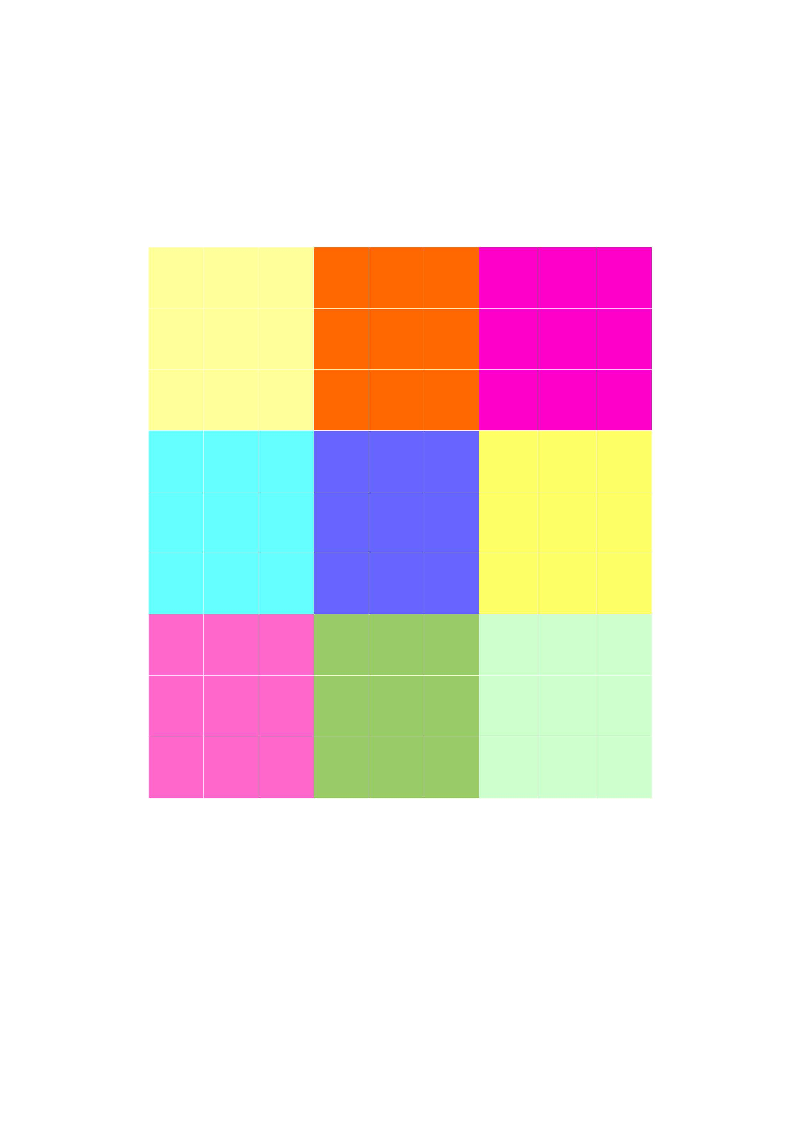 Figure 5.1 : Global domain data
The region of local domain can be described by one of the following way.
Specify the the beginning and size of local domain with:
-
ni_glo, nj_glo: global size of x-axis and y-axis correspondingly.
-
ibegin, jbegin: global position on x-axis and y-axis where a local domain begin
-
ni, nj: local size of domain of each process on x-axis and y-axis
Or tell XIOS exactly the global position of each point in the local domain, from left to right, top to bottom with:
- i_index, j_index: array of global position of every point in the local domain. It is very useful when local domains do not align with each other.
For example, with the first method, the local domain in the middle (the blue one) can be specified with:
CALL xios_set_domain_attr("domain_A",ni_glo=9, nj_glo=9, ibegin=3, ni=3, jbegin=3, nj=3)
The second method demands only two arrays:
CALL xios_set_domain_attr("domain_A",ni_glo=9, nj_glo=9, i_index=iIndex, j_index=jIndex)
and
- iIndex={3,4,5,3,4,5,3,4,5}, jIndex = {3,3,3,4,4,4,5,5,5}
Local domain data#
Similar to define local index, local data can be done in two ways.
Specify the begining and size of data on the local domain:
-
data_ibegin, data_jbegin: the local position of data on x-axis and y-axis where data begins
-
data_ni, data_nj: size of data on each axis
Or specify data with its position in the local domain, from left to right, top to bottom with
- data_i_index, data_j_index: array of local position of data in the local domain.
Beside the attributes above, one of the essential attributes to define is dimensional size of data - data_dim. Although domain has two dimensions, data are not required to be 2-dimensional. In particular, for case of data_dim == 1, XIOS uses an 1-dimensional block distribution of data, distributed along the first dimension, the x-axis.
With the first way to define data on a local domain, we can use:
CALL xios_set_domain_attr("domain_A",data_dim=2, data_ibegin=-1, data_ni=ni+2, data_jbegin=-1, data_nj=nj+2)
In order to be processed correctly, data must be specified with the begining and size of its block . For two-dimensional data, it can be done with data_ibegin, data_ni for the first dimension and data_jbegin, data_nj for the second dimension. In case of one-dimensional data, it is only necessary to determine data_ibegin and data_ni. Although the valid data must be inside a local domain, it is not neccessary for data to have same size as local domain. In fact, data can have larger size than domain on each dimension, this is often the case of "ghost cell". The attributes data_ibegin and data_jbegin specify the offset of data from local domain. For local domain_A, the negative value indicates that data is larger than local domain, the valid part of data needs extracted from the real data. A positive value indicates data is smaller than local domain. The default value of data_ibegin/data_jbegin is 0, which implies that data fit into local domain properly.
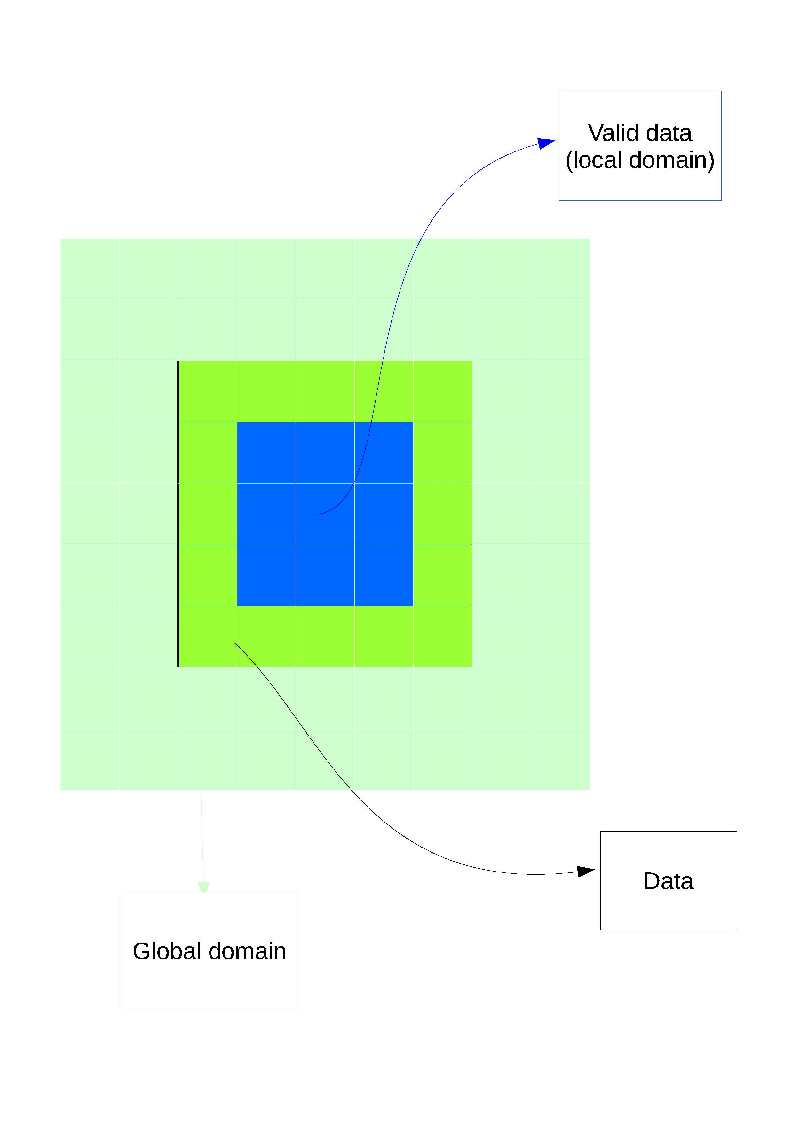 Figure 5.2 : Local domain with data
On Figure 5.2, local domain occupies the center of the global domain, where real data fill up a larger region. Only data inside the local domain, represented by blue cells, are valid.
With the secon way, data can be represented with:
CALL xios_set_domain_attr("domain_A",data_dim=2, data_i_index=dataI, data_j_index=dataJ)
with
-
dataJ = {-1,-1,-1,-1,-1,0,0,0,0,0,1,1,1,1,1,2,2,2,3,3,3,3,3}
-
dataI = {-1,0,1,2,3,-1,0,1,2,3,-1,0,1,2,3,-1,0,1,2,3,-1,0,1,2,3}
As mentioned, data on a domain are two-dimensional but in some cases, there is a need to write data continously, there comes one-dimensional data. With the precedent example, we can define one dimensional data with:
CALL xios_set_domain_attr("domain_A",data_dim=1, data_i_index=dataI)
and
- dataI = {-6,-5,-4,-3,-2,-1,0,1,2,3,4,5,6,7,8,9,10,11,12,13,14,15,16,17,18}
Above are the mandatory attributes to define local domain. There are some auxilliary attributes which make data meaningful, especially for meteorological one. The next section disscuses these attributes.
Longitude and latitude#
Different from the previous version, in XIOS 2.0, lonngitude and latitude are optional. Moreover, to be coherent to the data_dim concept, there are more ways to input longitude and latitude values.
Like data, longitude and latitude values can be one or two dimension. The first ones are represented with lonvalue_1d, latvalue_1d; the second ones are specified with lonvalue_2d and latvalue_2d.
With the same domain_A, we can set longitude and latitude values by calling:
CALL xios_set_domain_attr("domain_A",lonvalue_1d=lon1D, latvalue_1d=lat1D)
with
-
lon1D = {30, 40, 50, 30, 40, 50, 30, 40, 50}
-
lat1D = {30, 30, 30, 40, 40, 40, 50, 50, 50}
Or by using two-dimension longitude and latitude
CALL xios_set_domain_attr("domain_A",lonvalue_2d=lon2D, latvalue_1d=lat2D)
with
-
lon2D = {\begin{array}{ccc} 30 & 40 & 50\ 30 & 40 & 50\ 30 & 40 & 50 \end{array}}
-
lat1D = { \begin{array}{ccc} 30 & 30 & 30\ 40 & 40 & 40\ 50 & 50 & 50 \end{array}}
For unstructured mesh, a cell can have different number of vertices than rectinlinear, in this case, longitude and latitude value of the vertex of cell are specified with bounds_lon_1d and bounds_lat_1d.
For curvilinear mesh, bounds_lon_2d and bounds_lat_2d provide a convenient way to define longitude and latitude value for the vertex of the cell. However, it is possible to use bounds_lon_1d and bounds_lat_1d to describe these values.
One thing to remind, only *_1d or *_2d attributes are used, if *_1d and *_2d of a same attribute are provides, there will be runtime error.
All attributes of domain can be found in Reference Guide.
Axis#
Like Domain, Axis is a sub-component of Grid but is one dimension. In meteorological applications, axis represents a vertical line with different levels.
Working with configuration file#
The way to define an axis with configuration file is similar to define a domain.
Basic configuration#
Similar to domain, an axis is defined inside its definition part with the tag axis_definition.
<axis_definition>
  <axis id="axis_A" />
  <axis axis_ref="axis_A" />
</axis_definition>
The first one is to specify explicitly identification of an axis with an id.
<axis_definition>
  <axis id="axis_A" />
</axis_definition>
In this way, with id, the axis can be processed, e.x modified its attributes, with Fortran interface; besides, it is only possible to reference to a axis whose id is explicitly defined.
To make a reference to an axis, we use axis_ref
<axis_definition>
  <axis axis_ref="axis_A" />
</axis_definition>
An axis defined by axis_ref will inherit all attributes of the referenced one, except its id attribute. If there is no id specified, an implicit one is assigned to this new axis. The axis with implicit id can only be used inside the scope where it is defined, it can not be referenced, nor be processed. It is rare to define an axis without id inside axis_definition.
To define a new axis inside a grid, we use the tag axis.
<grid id="grid_A">
   <axis axis_ref="axis_A" />
</grid>
The xml lines above can be translated as: the grid_A composed of an axis_A that is defined somewhere else before. More precisely, the grid grid_A is constituted of a "unknown id" axis which has inherited all attributes (and their values) from axis A (name, long name, i_index, j_index, ... etc).
Advanced configuration#
Like domain, there are several transformation which can be defined with configuration file. All transformations on an axis have form *_axis.
Till now, XIOS supports the following transformation on axis:
-
zoom_axis: Like zoom functionality in XIOS 1.0, the destination grid is the zoomed region of the source grid.
-
interpolation_axis: Implement interpolation from an axis to one another. For now, only polynominal interpolation is available.
-
inverse_axis: Inverse an axis
It is not difficult to define a transformation: Include type of transformation inside axis definition, as the following
<axis_definition>
  <axis id="axis_A" />
  <axis id="axis_A_zoom" axis_ref="axis_A">
   <zoom_axis zoom_begin="1" zoom_n="3"/>
  </axis>
</axis_definition>
The concrete example is translated as: the axis named axis_A_zoom is transformed from axis name axis_A with a zoom activity. The detailed attributes of zoom_axis can be found in reference document, but simply it contains the begining and size of zoomed region.
One remark is the transformed axis SHOULD have an id, in this case, it's axis_A_zoom. As mentioned before, a no-id axis or any no-id component of XIOS can only be used inside its definition scope.
To make use of transformation, the grid must contain axis which references to transformed ones.
<grid id="grid_A">
  <axis axis_ref="axis_A" />
</grid>
<grid id="grid_A_zoom">
  <axis axis_ref="axis_A_zoom" />
</grid>
On defining this way, we tell XIOS to establish a connection between two grids by a transformation (zoom) with: grid source - grid_A, grid destination - grid_A_zoom.
As mentioned in Grid Chapter, in order to use transformed grid, just reference to it in field_definition
<field_definition level="1" enabled=".TRUE." default_value="9.96921e+36">
  <field id="field_A"  operation="average" freq_op="3600s" grid_ref="grid_A" />
  <field id="field_A_zoom"  operation="average" freq_op="3600s" grid_ref="grid_A_zoom" />
 </field_definition>
Although xml is helpful to define several configurations, it can not be used to customize attributes of axis. So it's the turn of Fortran interface.
Working with FORTRAN code#
Although axis is not as complexe as domain, there are some mandatory attributes to define. Different from precedent version, XIOS 2.0 supports distribution of data on a axis. The followings describe the essential parts of axis. Details of its attributes and operations can be found in XIOS reference guide.
Local axis index#
Axis is often used with domain, which is broken into several distributed pieces, to make a 3 dimension grid. However, there are cases in which data on axis are distributed among processes. Following we consider a simple case: a axis with global size 9 and its data are distributed evenly among 3 client processes, each of which has size 3.
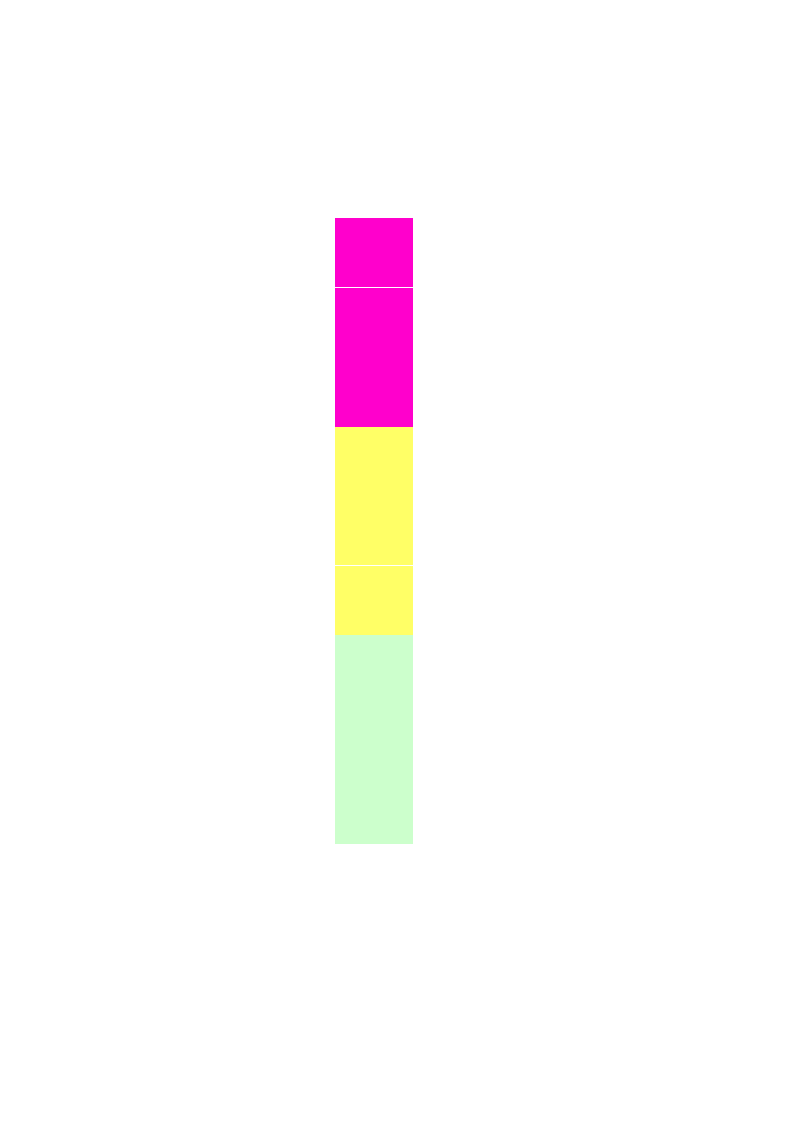
The local axis can be described by the following way.
Specify the the beginning and size of local axis with:
-
n_glo: global size of axis.
-
begin: global position where a local axis begin
-
n: local size of axis on each process
For example, the local axis in the middle (the yellow one) can be specified with:
CALL xios_set_axis_attr("axis_A",n_glo=9, begin=3, n=3)
Local axis data#
Simpler than local domain data, data on axis is always on-dimension. Like local domain data, local axis data represent the data offset from local axis, and it can be defined in two ways.
Specify the begining and size of data on the local axis:
-
data_begin: the local position of data on axis where data begins
-
data_n: size of data on each local axis
Or specify data with its position in the local axis:
- data_index: array of local position of data in the local axis.
Although the valid data must be inside a local axis, it is not neccessary for data to have same size. In fact, data can have larger size than local axis.
CALL xios_set_axis_attr("axis_A", data_begin=-1, data_n=n+2)
For local axis_A, the negative value of data_begin indicates that data is larger than local axis, the valid part of data needs extracted from the real data. If data_begin has a positive value, that means data size is smaller than local axis. The default value of data_begin is 0, which implies that local data fit into local axis properly.
Loal data can be defined with:
CALL xios_set_axis_attr("axis_A",data_index=data)
with
- data = {-1,0,1,2,3}
Value#
Value of axis plays a same role as longitude and latitude of domain. As local data, it can be distributed among processes.
CALL xios_set_axis_attr("axis_A", value=valueAxis)
with
- valueAxis = {30, 40, 50}
Because there is a need of direction of an axis, then comes the attribute positive
CALL xios_set_axis_attr("axis_A", positive='up')
All attributes of axis can be found in Reference Guide.
XIOS parameterization#
Some of XIOS behaviors can be configured using options. Those options must be exprhessed as variables in a specific context whose id must be "xios" as shown below.
<?xml version="1.0"?>
<simulation>
    <!-- Actual context(s) used by the simulation ommited -->

    <context id="xios">
        <variable_definition>
            <variable id="option_name" type="option_type">option_value</variable>
        </variable_definition>
    </context>
</simulation>
By default file distribution among server-two pools is optimized for bandwidth. An alternative way of distributing files is possible in order to minimize memory consumption by level-two servers. For this, two additional parameters should be specified:
-
server2_dist_file_memory (type: bool) activates memory optimization.
-
server2_dist_file_memory_ratio (type: double) (optional) takes value from 0 (memory optimization) to 1 (bandwidth optimization). The default value is 0.5.
Buffer related options#
By default, XIOS tries to guess the required buffers sizes to ensure efficient client-server communications. However it might sometimes be useful to tweak the buffers sizes so XIOS provides the following options:
-
optimal_buffer_size (type: string) can be either "memory" or "performance". When using the "memory" mode, XIOS will try to use buffers as small as possible while still ensuring that the bigger message will fit. When using the "performance" mode, XIOS will ensure that all active fields can be buffered without having to flush the buffers. This mode is used by default since it allows more asynchronism and thus better performance at the cost of being quite memory hungry.
-
minimum_buffer_size (type: int) defines the minimum buffer size in bytes (8192 by default). This value will be used by XIOS only for buffers whose detected size is smaller than the user defined minimum size.
-
buffer_size_factor (type: int) allows to modify the buffers sizes by multiplying the detected sizes by an user defined factor (1.0 by default). For each allocated buffers, the used size is defined as $$ {\scriptstyle \text{used_size}\;=\;\min\left(\text{minimum_buffer_size},\;\text{detected_size}\;\times\;\text{buffer_size_factor}\right)} $$